WHSAR SOFTWARE · BUSINESS-CRM
WHCRM
Business CRM + Team + Projects + Marketing + Communications + Content Publishing.
WHSAR verified product
PRODUCT OVERVIEW
Built for real workflows.
Business CRM + Team + Projects + Marketing + Communications + Content Publishing.
Version1.3.1
Typebusiness-crm
MarketGlobal / Local pricing
SupportWHSAR Support
FEATURES
Everything configured for this product.
1. Customer Management
2. Lead Management
3. Sales Pipeline
4. Follow-Up Management
5. Task Management
6. Team & User Management
7. Roles & Permissions
8. Dashboard & Analytics
9. Reports & Activity Tracking
10. Cloud-Based & Mobile Friendly
PRODUCT TOUR
Explore the interface.
FULL DESCRIPTION
Complete product details.
# WHCRM — Smart CRM & Customer Management SaaS
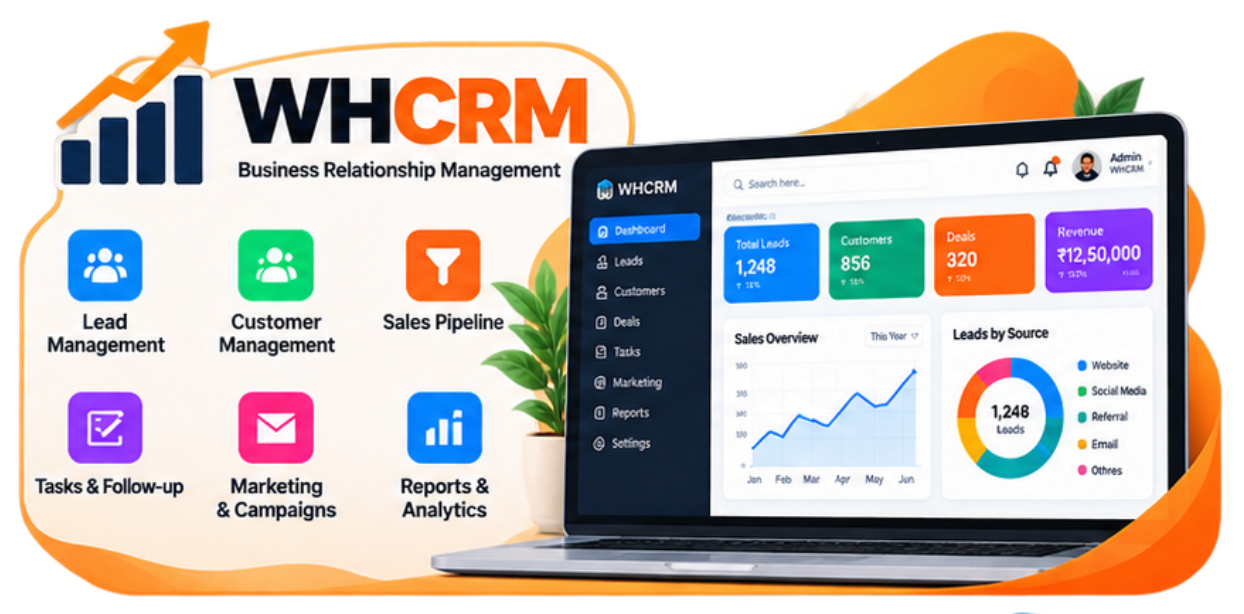
**WHCRM** is a modern, powerful, and easy-to-use **Cloud-based Customer Relationship Management (CRM) Software** designed to help businesses manage customers, leads, sales, follow-ups, tasks, communications, and business activities from one centralized platform.
Whether you run a small business, growing startup, service company, agency, sales team, or large organization, WHCRM helps you organize your customer data, improve sales workflow, manage relationships, and keep your entire business process under control.
## 🚀 Why WHCRM?
Managing customers and sales through spreadsheets, notebooks, WhatsApp messages, and multiple disconnected tools can become difficult as your business grows.
WHCRM brings everything together in one professional platform.
With WHCRM, you can:
* Manage customers and contacts
* Capture and manage leads
* Track sales opportunities
* Manage follow-ups
* Create and assign tasks
* Track customer interactions
* Manage sales activities
* Monitor business performance
* Generate reports
* Manage team members and permissions
* Access your CRM from anywhere
**One platform. One dashboard. Complete customer management.**
---
# ⭐ Key Features
### 👥 Customer Management
Maintain complete customer information in one place.
* Add unlimited customers
* Customer profiles
* Contact information
* Company information
* Customer status
* Customer notes
* Customer history
* Follow-up records
* Activity timeline
* Customer search and filtering
* Customer-wise activity tracking
---
### 🎯 Lead Management
Capture, organize, and manage your leads efficiently.
* Create new leads
* Lead source management
* Lead status
* Lead assignment
* Lead conversion
* Lead notes
* Lead follow-ups
* Lead activity history
* Lead search and filtering
* Track lead progress
Convert potential customers into actual customers through an organized sales workflow.
---
### 💼 Sales & Opportunity Management
Keep track of your sales pipeline from initial contact to successful conversion.
* Sales opportunities
* Pipeline management
* Opportunity stages
* Deal value
* Expected closing date
* Assigned salesperson
* Deal status
* Sales notes
* Follow-up tracking
* Conversion tracking
Get a clear overview of where every potential sale stands.
---
### 📅 Follow-Up Management
Never miss an important customer follow-up.
Create and manage:
* Follow-up dates
* Follow-up reminders
* Customer calls
* Meetings
* Sales follow-ups
* Pending activities
* Completed activities
* Next-action planning
Your team can easily see what needs to be done and when.
---
### ✅ Task Management
Organize daily work and assign responsibilities to your team.
* Create tasks
* Assign tasks
* Set priorities
* Set deadlines
* Task status
* Pending tasks
* Completed tasks
* Task history
* Team task tracking
---
### 👨💼 Team & Staff Management
Manage your CRM team from a centralized administration panel.
* Add team members
* User roles
* Permission management
* Assign leads
* Assign customers
* Assign tasks
* User activity tracking
* Team performance monitoring
---
### 🔐 Role-Based Access Control
Control exactly what each user can access.
Create different roles and permissions for:
* Super Admin
* Administrator
* Manager
* Sales Executive
* Support Staff
* Other custom users
Restrict access to sensitive business information according to user responsibilities.
---
### 📊 Dashboard & Business Analytics
Get a complete overview of your business from a single dashboard.
Monitor important information such as:
* Total customers
* Total leads
* New leads
* Converted leads
* Active opportunities
* Sales activities
* Pending follow-ups
* Pending tasks
* Completed tasks
* Team activities
* Sales performance
Visual dashboards make it easier to understand your business at a glance.
---
### 📈 Reports & Insights
Generate useful reports to understand your business performance.
Reports can include:
* Customer reports
* Lead reports
* Sales reports
* Conversion reports
* Follow-up reports
* Task reports
* Team performance
* Activity reports
* Opportunity reports
Use business data to identify trends and improve your workflow.
---
### 🔎 Powerful Search & Filtering
Find the information you need quickly.
Search and filter customers, leads, opportunities, tasks, and activities using multiple criteria.
Save time instead of manually searching through large amounts of data.
---
### 📝 Notes & Activity Tracking
Keep important information connected to the correct customer or lead.
Record:
* Customer notes
* Sales notes
* Call records
* Meeting information
* Follow-up details
* Internal remarks
* Activity history
This gives your team a complete picture of customer interactions.
---
### 🔔 Notifications & Reminders
Stay informed about important CRM activities.
Receive notifications and reminders for:
* New leads
* Assigned tasks
* Follow-ups
* Important activities
* Deadlines
* Customer updates
* Team activities
---
### 📱 Responsive & Mobile-Friendly
WHCRM is designed to work across modern devices.
Access your CRM from:
* Desktop
* Laptop
* Tablet
* Mobile phone
Your business data stays accessible wherever you work.
---
### ☁️ Cloud-Based SaaS
WHCRM is built as a modern SaaS platform.
You can access your CRM through a web browser without depending on a single computer.
Benefits include:
* Anywhere access
* Centralized data
* Easy management
* Scalable infrastructure
* Automatic platform updates
* Multi-user access
* Secure web-based environment
---
# 🏢 Built for Different Businesses
WHCRM can be used by many types of organizations, including:
* IT companies
* Software companies
* Digital agencies
* Marketing agencies
* Sales organizations
* Service businesses
* Consulting companies
* Real estate businesses
* Education businesses
* Training institutes
* Healthcare businesses
* Financial service companies
* E-commerce businesses
* Freelancers
* Startups
* Small and medium businesses
* Enterprise teams
---
# ⚡ Benefits of WHCRM
### Save Time
Keep customer information, leads, tasks, and sales activities in one place.
### Improve Customer Relationships
Maintain complete customer history and follow-up information.
### Increase Sales Visibility
Understand your sales pipeline and identify pending opportunities.
### Improve Team Productivity
Assign tasks and responsibilities to the right team members.
### Reduce Missed Follow-Ups
Keep track of upcoming activities and customer follow-ups.
### Make Better Decisions
Use centralized business data and reports to understand performance.
### Scale Your Business
WHCRM provides a structured system that can grow with your organization.
---
# 🔄 Simple CRM Workflow
**Lead → Follow-Up → Opportunity → Customer → Sales → Relationship**
WHCRM helps your team manage the complete customer journey from the first interaction to long-term customer management.
---
# 🛡️ Security & Access
WHCRM is designed with business data security and controlled access in mind.
Key capabilities include:
* Secure user authentication
* Role-based permissions
* Controlled data access
* User activity management
* Session management
* Protected administration area
* Centralized account management
---
# 🎯 Designed for Modern Teams
WHCRM combines a clean interface with powerful CRM functionality so that your team can focus on customers instead of complicated software.
The system is designed to be:
**Simple • Fast • Professional • Scalable**
---
# 💻 SaaS Experience
With WHCRM SaaS, businesses can use CRM functionality without managing complicated infrastructure themselves.
Users can simply:
**Create Account → Choose Plan → Start Using WHCRM**
Your CRM environment can then be used to manage customers, leads, sales activities, tasks, and business operations from a centralized dashboard.
---
# 📦 What's Included
Depending on your selected WHCRM plan, the platform can provide access to:
* CRM Dashboard
* Customer Management
* Lead Management
* Sales Management
* Opportunity Management
* Follow-Up Management
* Task Management
* Team Management
* Role & Permission Management
* Activity Tracking
* Notifications
* Reports
* Analytics
* Search & Filters
* Responsive Web Interface
* SaaS Account Management
---
# 🌟 WHCRM — Your Business, Organized
WHCRM gives your business a centralized system for managing customer relationships, sales activities, leads, tasks, and team workflows.
Instead of managing customer information across spreadsheets, notebooks, messages, and separate applications, bring your business activities together with **WHCRM**.
### Manage Customers.
### Manage Leads.
### Manage Sales.
### Manage Your Team.
### Grow Your Business.
**WHCRM — Smart CRM for Modern Businesses.**
**WHCRM** is a modern, powerful, and easy-to-use **Cloud-based Customer Relationship Management (CRM) Software** designed to help businesses manage customers, leads, sales, follow-ups, tasks, communications, and business activities from one centralized platform.
Whether you run a small business, growing startup, service company, agency, sales team, or large organization, WHCRM helps you organize your customer data, improve sales workflow, manage relationships, and keep your entire business process under control.
## 🚀 Why WHCRM?
Managing customers and sales through spreadsheets, notebooks, WhatsApp messages, and multiple disconnected tools can become difficult as your business grows.
WHCRM brings everything together in one professional platform.
With WHCRM, you can:
* Manage customers and contacts
* Capture and manage leads
* Track sales opportunities
* Manage follow-ups
* Create and assign tasks
* Track customer interactions
* Manage sales activities
* Monitor business performance
* Generate reports
* Manage team members and permissions
* Access your CRM from anywhere
**One platform. One dashboard. Complete customer management.**
---
# ⭐ Key Features
### 👥 Customer Management
Maintain complete customer information in one place.
* Add unlimited customers
* Customer profiles
* Contact information
* Company information
* Customer status
* Customer notes
* Customer history
* Follow-up records
* Activity timeline
* Customer search and filtering
* Customer-wise activity tracking
---
### 🎯 Lead Management
Capture, organize, and manage your leads efficiently.
* Create new leads
* Lead source management
* Lead status
* Lead assignment
* Lead conversion
* Lead notes
* Lead follow-ups
* Lead activity history
* Lead search and filtering
* Track lead progress
Convert potential customers into actual customers through an organized sales workflow.
---
### 💼 Sales & Opportunity Management
Keep track of your sales pipeline from initial contact to successful conversion.
* Sales opportunities
* Pipeline management
* Opportunity stages
* Deal value
* Expected closing date
* Assigned salesperson
* Deal status
* Sales notes
* Follow-up tracking
* Conversion tracking
Get a clear overview of where every potential sale stands.
---
### 📅 Follow-Up Management
Never miss an important customer follow-up.
Create and manage:
* Follow-up dates
* Follow-up reminders
* Customer calls
* Meetings
* Sales follow-ups
* Pending activities
* Completed activities
* Next-action planning
Your team can easily see what needs to be done and when.
---
### ✅ Task Management
Organize daily work and assign responsibilities to your team.
* Create tasks
* Assign tasks
* Set priorities
* Set deadlines
* Task status
* Pending tasks
* Completed tasks
* Task history
* Team task tracking
---
### 👨💼 Team & Staff Management
Manage your CRM team from a centralized administration panel.
* Add team members
* User roles
* Permission management
* Assign leads
* Assign customers
* Assign tasks
* User activity tracking
* Team performance monitoring
---
### 🔐 Role-Based Access Control
Control exactly what each user can access.
Create different roles and permissions for:
* Super Admin
* Administrator
* Manager
* Sales Executive
* Support Staff
* Other custom users
Restrict access to sensitive business information according to user responsibilities.
---
### 📊 Dashboard & Business Analytics
Get a complete overview of your business from a single dashboard.
Monitor important information such as:
* Total customers
* Total leads
* New leads
* Converted leads
* Active opportunities
* Sales activities
* Pending follow-ups
* Pending tasks
* Completed tasks
* Team activities
* Sales performance
Visual dashboards make it easier to understand your business at a glance.
---
### 📈 Reports & Insights
Generate useful reports to understand your business performance.
Reports can include:
* Customer reports
* Lead reports
* Sales reports
* Conversion reports
* Follow-up reports
* Task reports
* Team performance
* Activity reports
* Opportunity reports
Use business data to identify trends and improve your workflow.
---
### 🔎 Powerful Search & Filtering
Find the information you need quickly.
Search and filter customers, leads, opportunities, tasks, and activities using multiple criteria.
Save time instead of manually searching through large amounts of data.
---
### 📝 Notes & Activity Tracking
Keep important information connected to the correct customer or lead.
Record:
* Customer notes
* Sales notes
* Call records
* Meeting information
* Follow-up details
* Internal remarks
* Activity history
This gives your team a complete picture of customer interactions.
---
### 🔔 Notifications & Reminders
Stay informed about important CRM activities.
Receive notifications and reminders for:
* New leads
* Assigned tasks
* Follow-ups
* Important activities
* Deadlines
* Customer updates
* Team activities
---
### 📱 Responsive & Mobile-Friendly
WHCRM is designed to work across modern devices.
Access your CRM from:
* Desktop
* Laptop
* Tablet
* Mobile phone
Your business data stays accessible wherever you work.
---
### ☁️ Cloud-Based SaaS
WHCRM is built as a modern SaaS platform.
You can access your CRM through a web browser without depending on a single computer.
Benefits include:
* Anywhere access
* Centralized data
* Easy management
* Scalable infrastructure
* Automatic platform updates
* Multi-user access
* Secure web-based environment
---
# 🏢 Built for Different Businesses
WHCRM can be used by many types of organizations, including:
* IT companies
* Software companies
* Digital agencies
* Marketing agencies
* Sales organizations
* Service businesses
* Consulting companies
* Real estate businesses
* Education businesses
* Training institutes
* Healthcare businesses
* Financial service companies
* E-commerce businesses
* Freelancers
* Startups
* Small and medium businesses
* Enterprise teams
---
# ⚡ Benefits of WHCRM
### Save Time
Keep customer information, leads, tasks, and sales activities in one place.
### Improve Customer Relationships
Maintain complete customer history and follow-up information.
### Increase Sales Visibility
Understand your sales pipeline and identify pending opportunities.
### Improve Team Productivity
Assign tasks and responsibilities to the right team members.
### Reduce Missed Follow-Ups
Keep track of upcoming activities and customer follow-ups.
### Make Better Decisions
Use centralized business data and reports to understand performance.
### Scale Your Business
WHCRM provides a structured system that can grow with your organization.
---
# 🔄 Simple CRM Workflow
**Lead → Follow-Up → Opportunity → Customer → Sales → Relationship**
WHCRM helps your team manage the complete customer journey from the first interaction to long-term customer management.
---
# 🛡️ Security & Access
WHCRM is designed with business data security and controlled access in mind.
Key capabilities include:
* Secure user authentication
* Role-based permissions
* Controlled data access
* User activity management
* Session management
* Protected administration area
* Centralized account management
---
# 🎯 Designed for Modern Teams
WHCRM combines a clean interface with powerful CRM functionality so that your team can focus on customers instead of complicated software.
The system is designed to be:
**Simple • Fast • Professional • Scalable**
---
# 💻 SaaS Experience
With WHCRM SaaS, businesses can use CRM functionality without managing complicated infrastructure themselves.
Users can simply:
**Create Account → Choose Plan → Start Using WHCRM**
Your CRM environment can then be used to manage customers, leads, sales activities, tasks, and business operations from a centralized dashboard.
---
# 📦 What's Included
Depending on your selected WHCRM plan, the platform can provide access to:
* CRM Dashboard
* Customer Management
* Lead Management
* Sales Management
* Opportunity Management
* Follow-Up Management
* Task Management
* Team Management
* Role & Permission Management
* Activity Tracking
* Notifications
* Reports
* Analytics
* Search & Filters
* Responsive Web Interface
* SaaS Account Management
---
# 🌟 WHCRM — Your Business, Organized
WHCRM gives your business a centralized system for managing customer relationships, sales activities, leads, tasks, and team workflows.
Instead of managing customer information across spreadsheets, notebooks, messages, and separate applications, bring your business activities together with **WHCRM**.
### Manage Customers.
### Manage Leads.
### Manage Sales.
### Manage Your Team.
### Grow Your Business.
**WHCRM — Smart CRM for Modern Businesses.**
Product Screenshot
LET'S BUILD SOMETHING USEFUL
Software, infrastructure and digital services — together.
Talk to WHSAR about software, hosting, automation, deployment, connectivity or a custom technology requirement.